---
title: "OAuth 2.0"
description: "Delegated access for third-party applications."
canonical: "https://developers.fnlb.net/docs/oauth2"
markdown: "/docs/oauth2.md"
---
> ## Documentation Index
> Fetch the complete documentation index at: https://developers.fnlb.net/llms.txt
> Use this file to discover all available pages before exploring further.
# OAuth 2.0
OAuth2 lets your application call the API as a user who approved it. You never see their password. The client id comes from [Applications](/docs/developer-portal.md). Applications are confidential by default; enable **Public client** in the OAuth2 tab when the application cannot keep a secret. Confidential clients use a client secret; public clients use PKCE instead.
FNLB uses the authorization code grant. The user approves your app in the browser. Your server then exchanges the code at [POST /oauth2/token](/api?method=POST&path=/oauth2/token).
## Authorize URL
Open the application, go to the **OAuth2** tab, choose a redirect URI and the scopes you need, and copy the generated URL. It has this shape:
```http
https://fnlb.net/oauth2/authorize?response_type=code&client_id=CLIENT_ID&redirect_uri=REDIRECT_URI&scope=SCOPE&state=STATE
```
| Parameter | Required | Description |
| :--- | :--- | :--- |
| `response_type` | yes | Always `code`. |
| `client_id` | yes | The application id. |
| `redirect_uri` | yes | A redirect URI saved on that application. |
| `scope` | yes | Space-separated scopes from the table below. |
| `state` | recommended | A random value you check when the user comes back, so you can reject a forged redirect. |
| `code_challenge` | public clients | Base64url-encoded SHA-256 hash of the verifier. |
| `code_challenge_method` | public clients | Must be `S256`. |
After the user approves, FNLB redirects to `redirect_uri` with `code` and your `state`.
## Exchange the code
```http
POST https://api.fnlb.net/v1/oauth2/token
Content-Type: application/x-www-form-urlencoded
grant_type=authorization_code&code=AUTHORIZATION_CODE&client_id=CLIENT_ID&client_secret=CLIENT_SECRET&redirect_uri=REDIRECT_URI
```
For a public client, omit `client_secret` and send the verifier used to create the authorization request:
```http
grant_type=authorization_code&code=AUTHORIZATION_CODE&client_id=CLIENT_ID&code_verifier=CODE_VERIFIER&redirect_uri=REDIRECT_URI
```
Confidential clients can send `client_id` and `client_secret` as HTTP Basic credentials or form fields. The secret starts with `FNLBOA2S_`. Public clients authenticate with `client_id` and S256 PKCE only.
```json
{
"access_token": "FNLBOA2AT_...",
"token_type": "Bearer",
"scope": "identify bots.read"
}
```
Send that access token on later calls:
```http
Authorization: Bearer FNLBOA2AT_YOUR_ACCESS_TOKEN
```
The token only includes the scopes the user approved, and only if those scopes are enabled on the application. A route that needs `bots.write` returns `403` when the token does not have it.
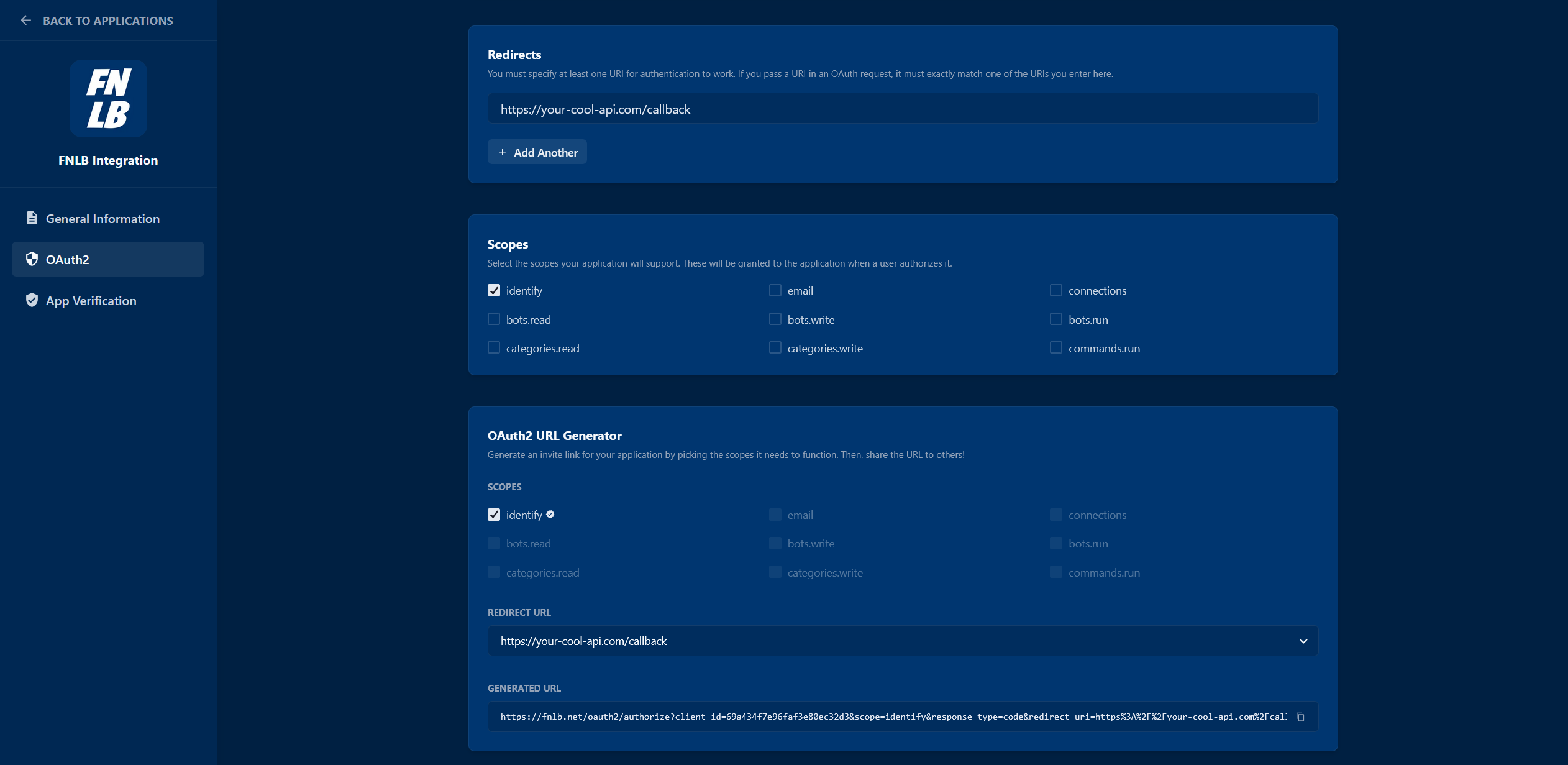
## Scopes
| Scope | Description |
| :--- | :--- |
| `identify` | Read the user's id, username, and flags. |
| `email` | Read the user's email address. |
| `connections` | Read linked third-party connections. |
| `bots.read` | List bots and read their settings. Also required by the [gateway](/gateway.md). |
| `bots.write` | Create, update, and delete bots and their settings. |
| `bots.run` | Start and stop bots from the [Node.js SDK](/docs/sdk-node.md). |
| `categories.read` | Read categories and their config. |
| `categories.write` | Create, update, and delete categories. |
| `commands.run` | Run bot commands, including cosmetic changes. |
| `openid` | Required for [GET /oauth2/userinfo](/api?method=GET&path=/oauth2/userinfo). Adds `id_token` on the token response when it is granted. |
| `profile` | Adds `preferred_username` to the userinfo response. |
Request only the scopes the app uses. Users see the list before they approve. The application must already allow every scope you put in the URL. Asking for one it does not allow returns `400`, and the user is not sent back with a code.
An application that is not verified can only be approved by its owner. Other accounts get `400` until the application is verified.
The code in the redirect lasts 10 minutes and is deleted when the exchange succeeds. A later exchange for the same user and application replaces the previous access token. The old `FNLBOA2AT_` value stops working.
## Userinfo
[GET /oauth2/userinfo](/api?method=GET&path=/oauth2/userinfo) is the OpenID Connect profile for the access token. It accepts only an OAuth2 token, it requires `openid`, and it allows 1000 requests per minute.
| Field | When it is present |
| :--- | :--- |
| `sub` | Always. This is the FNLB account id, the same value as `FNLB_BUCKET_ID`. |
| `email`, `email_verified` | The token also has `email`. |
| `preferred_username` | The token also has `profile`. |
[GET /user](/api?method=GET&path=/user) is the richer account route. It accepts an API token, a session, or an OAuth2 token with `identify`. Use userinfo when you are implementing a standard OpenID client. Use `/user` when you are calling the rest of the API.
## PKCE
For confidential clients, `code_challenge` is optional. Public clients must send `code_challenge` and `code_challenge_method=S256`. The challenge must be 43 to 128 characters, and the token request must include the matching `code_verifier`. The check is SHA-256 of the verifier, encoded as base64url.
The authorization code is single use. Sending it twice, or sending a `redirect_uri` that does not match the authorize request, returns `400`.
## Next
The token route in the API reference, including errors and the try client.
Read the account behind an access token with the `identify` scope.