> ## Documentation Index
> Fetch the complete documentation index at: https://developers.fnlb.net/llms.txt
> Use this file to discover all available pages before exploring further.
# FNLB Developer Portal
> Guides, OpenAPI references, and OAuth application management for Fortnite LobbyBot (FNLB).
Prefer Markdown. Append `.md` to any page URL, or send `Accept: text/markdown`. Full corpus: [https://developers.fnlb.net/llms-full.txt](https://developers.fnlb.net/llms-full.txt).
## Portal
- [Home](https://developers.fnlb.net/index.md): Portal overview and discovery links
- [API reference](https://developers.fnlb.net/api.md): api.fnlb.net OpenAPI wrapper
- [Gateway reference](https://developers.fnlb.net/gateway.md): gateway.fnlb.net OpenAPI wrapper
- [Authentication for agents](https://developers.fnlb.net/auth.md): Tokens, OAuth2, and discovery metadata
## Getting Started
- [FNLB Developer Documentation](https://developers.fnlb.net/docs.md): What lives in this portal, and where to go next.
- [Applications](https://developers.fnlb.net/docs/developer-portal.md): Applications, client credentials, and redirect URIs.
- [Authentication](https://developers.fnlb.net/docs/authenticating.md): API tokens and the Authorization header.
- [OAuth 2.0](https://developers.fnlb.net/docs/oauth2.md): Delegated access for third-party applications.
## API
- [API Reference](https://developers.fnlb.net/docs/api-reference.md): How the API fits together, and where each area lives in the reference.
- [Rate Limits](https://developers.fnlb.net/docs/rate-limits.md): Per-route API limits, and the gateway global limit.
- [Bots and Categories](https://developers.fnlb.net/docs/bots-and-categories.md): Create bots, organize categories, and read flags.
- [Bot Commands](https://developers.fnlb.net/docs/bot-commands.md): Run commands and send chat messages through the API.
- [Bulk Operations](https://developers.fnlb.net/docs/bulk-operations.md): Move many bots at once with strict rate limits.
- [Presets](https://developers.fnlb.net/docs/presets.md): Store and reuse cosmetic configurations.
- [Public Bots](https://developers.fnlb.net/docs/public-bots.md): List public bots without authentication.
## Gateway
- [Gateway Guide](https://developers.fnlb.net/docs/gateway.md): Real-time events from running bots.
- [Gateway REST Interface](https://developers.fnlb.net/docs/gateway-rest.md): Read connected bots, parties, and shards.
## Self Hosting
- [Self-hosting FNLB](https://developers.fnlb.net/docs/self-hosting.md): Run your own FNLB cluster.
- [Node.js SDK](https://developers.fnlb.net/docs/sdk-node.md): Control self-hosted bots from JavaScript.
## Specs
- [API OpenAPI](https://api.fnlb.net/openapi.json)
- [Gateway OpenAPI](https://gateway.fnlb.net/openapi.json)
- [API catalog](https://developers.fnlb.net/.well-known/api-catalog)
- [AI catalog](https://developers.fnlb.net/.well-known/ai-catalog.json)
---
---
title: "FNLB Developer Documentation"
description: "What lives in this portal, and where to go next."
canonical: "https://developers.fnlb.net/docs"
markdown: "/docs.md"
---
# FNLB Developer Documentation
Guides, the API reference, the gateway reference, and your applications all live in this portal. Use a guide when you need to know how something works. Open the reference when you need the exact request.
## In this portal
- **Applications** hold the OAuth2 client id, client secret, redirect URIs, and scopes for an app that acts on someone else's account. Open them from the sidebar.
- **Guides** are these pages: authentication, OAuth2, rate limits, the gateway, and self-hosting.
- **API reference** is the interactive catalog for `https://api.fnlb.net/v1`. Each page shows the method, path, body, and responses, and you can try a request while you are signed in.
- **Gateway reference** is the same kind of catalog for `https://gateway.fnlb.net/v1`. It shows bots that are connected right now, their parties, and the shards serving them.
The API is where a bot is created, configured, and told to run a command. The gateway is where you read what that bot is doing after it is online.
## The same ids
These values show up in more than one place. Use the id from the first call as the path or query value on the next one.
| Value | Where you read it | Where you send it |
| :--- | :--- | :--- |
| Account id | [GET /user](/api?method=GET&path=/user) `id` | Gateway query `FNLB_BUCKET_ID` |
| Bot id | [GET /bots](/api?method=GET&path=/bots) `id` | Command, friends, and [GET /bots/{botId}](/gateway?method=GET&path=/bots/{botId}) |
| Category id | [GET /categories](/api?method=GET&path=/categories) `id` | Bot `parent`, SDK `categories`, self-host `CATEGORIES` |
A bot that is offline is still in the API list. It is missing from the gateway list until that process connects.
## A call, then the live state
1. Create an [API token](/docs/authenticating.md#header) for your own account, or an [OAuth2 access token](/docs/oauth2.md#authorize-url) after a user approves your [application](/).
2. [GET /bots](/api?method=GET&path=/bots) returns `id` and `parent` for each bot. `parent` is the category id.
3. [POST /bots/{botId}/commands/run](/api?method=POST&path=/bots/{botId}/commands/run) runs a command on that id. The reply is text plus a format code, not the new party state.
4. [GET /bots/{botId}](/gateway?method=GET&path=/bots/{botId}) on the gateway, with your account id as `FNLB_BUCKET_ID`, returns the party and presence after the bot is connected.
5. To run the process yourself, pass the category id to the [Node.js SDK](/docs/sdk-node.md) or to `CATEGORIES` in [self-hosting](/self-hosting-guide). [GET /shards](/gateway?method=GET&path=/shards) then shows that cluster.
## What you can build
- Change cosmetics and run other bot commands through [POST /bots/{botId}/commands/run](/api?method=POST&path=/bots/{botId}/commands/run).
- List and edit bots, categories, and presets from the [API reference](/api.md).
- Read live party and presence state from the [gateway](/gateway.md).
- Run the bots yourself with the [Node.js SDK](/docs/sdk-node.md) or the [self-hosting](/self-hosting-guide) cluster.
## Start here
Create an OAuth2 client and copy its id and secret.
Send an API token or an access token on each request.
Ask a user to approve your app, then exchange the code.
Browse every API route and try one with your account.
Read connected bots, parties, and shards.
Run your own cluster against the same API.
---
---
title: "Applications"
description: "Applications, client credentials, and redirect URIs."
canonical: "https://developers.fnlb.net/docs/developer-portal"
markdown: "/docs/developer-portal.md"
---
# Applications
Applications are the OAuth2 clients for this account. Each one has its own client id, client secret, redirect URIs, and scopes. A personal API token is separate: that comes from your FNLB account, and it is covered in [Authenticating](/docs/authenticating.md).
## Create an application
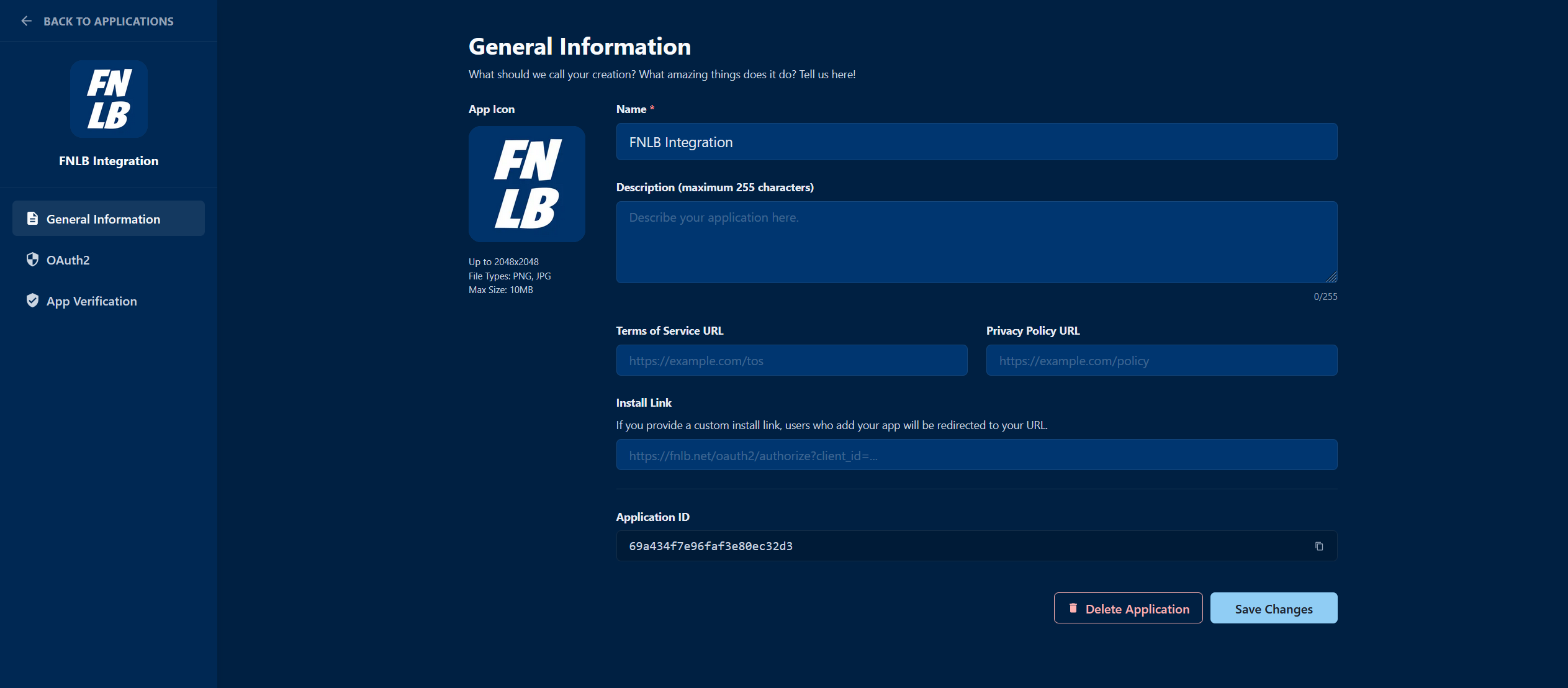
Use **Applications** in the sidebar, or open [Applications](/).
Choose **Create Application** and give it a name. You land on its settings.
Copy the **client id** and **client secret**. The secret is shown so you can store it. Treat it like a password.
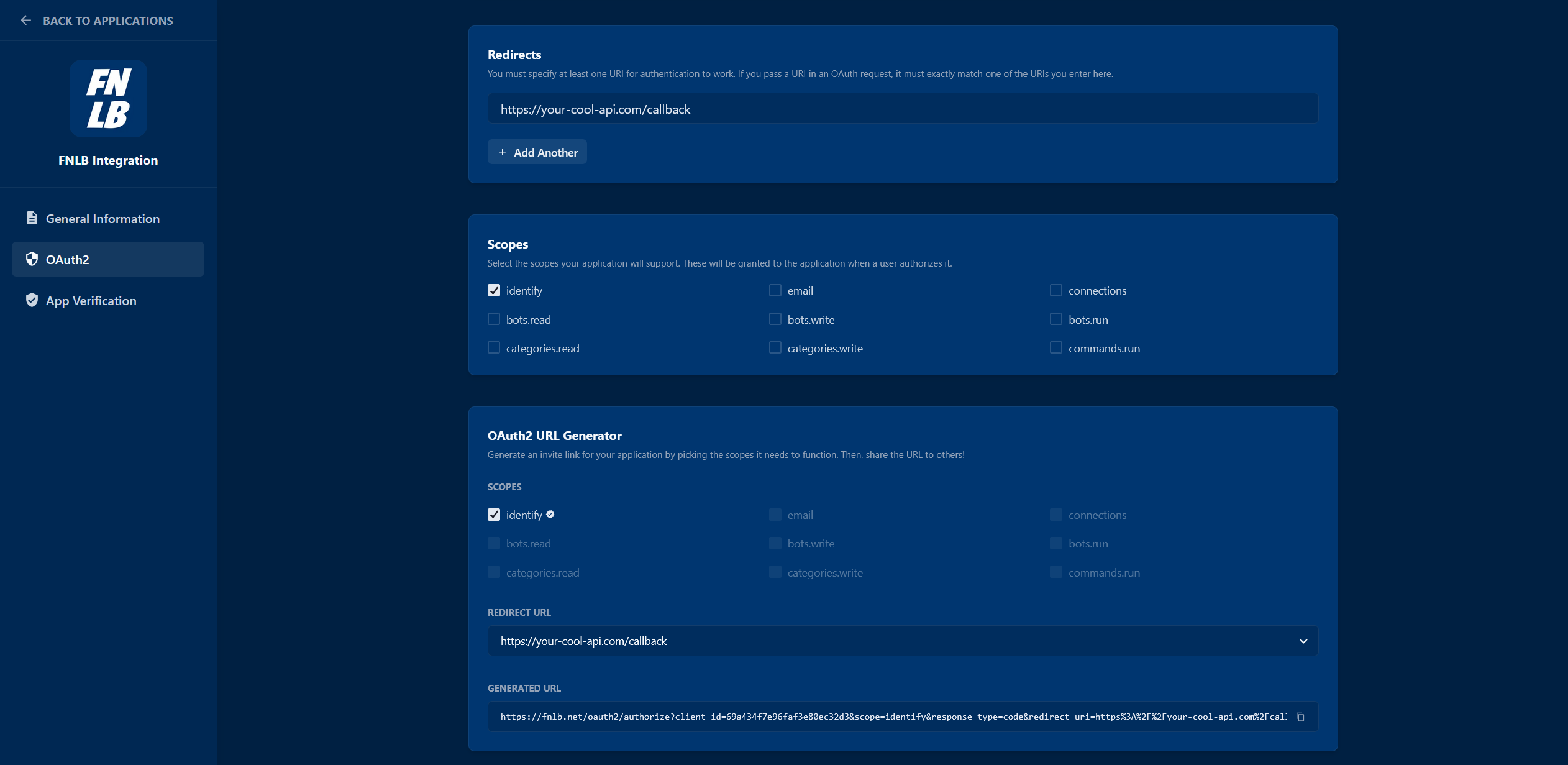
Open the **OAuth2** tab and add every URL that may receive an authorization code. The authorize URL on that tab is built from the redirect URI and scopes you select.
## What each field is for
- **Client id** identifies the application. It is safe to put in the authorize URL.
- **Client secret** proves the application when you exchange a code at [POST /oauth2/token](/api?method=POST&path=/oauth2/token). It starts with `FNLBOA2S_`. Send it from your server only.
- **Redirect URIs** are the only places FNLB will send a user after they approve the app.
- **Scopes** are the permissions users can grant. Turn a scope on here first. The authorize URL can only request scopes this application allows. The route then checks the token again. See [Scopes](/docs/oauth2.md#scopes).
If a client secret leaks, reset it on the OAuth2 tab. The old secret stops working immediately.
## Next
Send the user to the authorize URL and exchange the code.
Call the API with the access token you receive.
---
---
title: "Authentication"
description: "API tokens and the Authorization header."
canonical: "https://developers.fnlb.net/docs/authenticating"
markdown: "/docs/authenticating.md"
---
# Authentication
Every protected route needs an `Authorization` header. The API accepts three kinds of token. A route's page in the [API reference](/api.md) lists which kinds it accepts.
| Token | Starts with | Use it when |
| :--- | :--- | :--- |
| API token | `FNLB_` | Your own bots and account, from a server you control. |
| OAuth2 access token | `FNLBOA2AT_` | A user approved your [application](/docs/developer-portal.md#create-an-application). |
| Session | neither prefix | You are signed in here. **Try request** on a reference page sends it for you. |
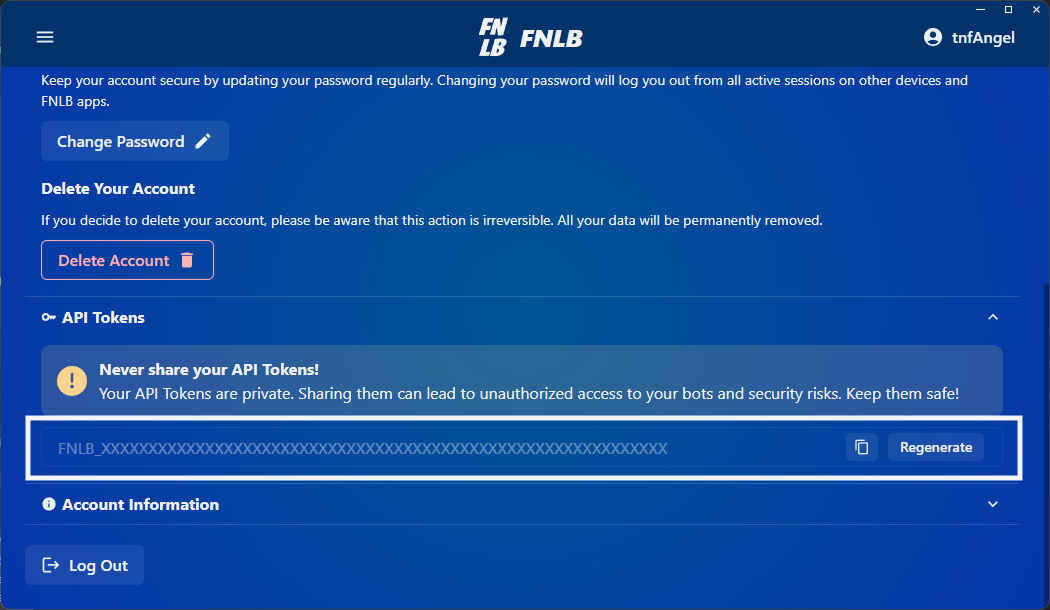
Create an API token from the FNLB app or the web dashboard at [app.fnlb.net/account](https://app.fnlb.net/account). Create an OAuth2 client from [Applications](/).
## Where each token works
| | API `api.fnlb.net/v1` | Gateway `gateway.fnlb.net/v1` | SDK `token` / `apiToken` |
| :--- | :--- | :--- | :--- |
| API token `FNLB_` | Routes that list API token | Only if the account has developer access | Yes |
| OAuth2 `FNLBOA2AT_` | Routes that list that scope | Needs `bots.read` | Needs `bots.run`, `categories.read`, and `bots.read` |
| Session | **Try request** while you are signed in | Not accepted | No |
The gateway always wants your account id in `FNLB_BUCKET_ID`. Read it from [GET /user](/api?method=GET&path=/user). The [REST interface](/gateway/rest-interface#authentication) shows the query on a real URL.
## Header
Send the token as a bearer credential. The `Bearer` prefix is optional. The API strips it when it is present.
```http
Authorization: Bearer FNLB_YOUR_API_TOKEN
```
Keep API tokens and client secrets on a server. A token in a browser, a mobile app, or a public repository can be copied, and it can act as you until you revoke it.
## Example
This lists the bots on the account that owns the token. The same call is [GET /bots](/api?method=GET&path=/bots) in the reference, where you can run it against your own account.
```bash
curl https://api.fnlb.net/v1/bots \
-H "Authorization: Bearer FNLB_YOUR_API_TOKEN"
```
A successful response is a JSON array of bot objects. A failed response is JSON too:
```json
{
"type": "error",
"errors": [
{
"message": "Invalid token provided.",
"type": "general",
"errorCode": "net.fnlb.errors.auth.invalid_token"
}
]
}
```
`errorCode` stays stable. Match on that, not on `message`.
## Common errors
| Code | Meaning |
| :--- | :--- |
| `net.fnlb.errors.common.invalid_request` | The path, query, or body does not match the route. |
| `net.fnlb.errors.common.rate_limit_exceeded` | This IP hit the limit for this route. See [Rate limits](/docs/rate-limits.md#api). |
| `net.fnlb.errors.common.limit_exceeded` | An account limit was reached, such as how many bots you can create. |
| `net.fnlb.errors.common.maintenance_mode` | The API is in maintenance. Retry later. |
| `net.fnlb.errors.auth.invalid_token` | The token could not be read, or it was revoked. |
| `net.fnlb.errors.auth.invalid_api_token` | The value is not an active API token. |
| `net.fnlb.errors.auth.unauthorized` | The route required a token and did not get a valid one. |
| `net.fnlb.errors.auth.forbidden` | The token is valid, but it is missing a scope or a permission. |
| `net.fnlb.errors.auth.user_banned` | The account cannot call the API. |
HTTP status follows the same pattern as the reference: `400` for a bad request, `401` for a rejected token, `403` when the token cannot do this, `429` when the route was called too often.
## Next
Open a route and try it with the account you are signed in as.
Get an access token for someone else's account.
---
---
title: "OAuth 2.0"
description: "Delegated access for third-party applications."
canonical: "https://developers.fnlb.net/docs/oauth2"
markdown: "/docs/oauth2.md"
---
# OAuth 2.0
OAuth2 lets your application call the API as a user who approved it. You never see their password. The client id comes from [Applications](/docs/developer-portal.md). Applications are confidential by default; enable **Public client** in the OAuth2 tab when the application cannot keep a secret. Confidential clients use a client secret; public clients use PKCE instead.
FNLB uses the authorization code grant. The user approves your app in the browser. Your server then exchanges the code at [POST /oauth2/token](/api?method=POST&path=/oauth2/token).
## Authorize URL
Open the application, go to the **OAuth2** tab, choose a redirect URI and the scopes you need, and copy the generated URL. It has this shape:
```http
https://fnlb.net/oauth2/authorize?response_type=code&client_id=CLIENT_ID&redirect_uri=REDIRECT_URI&scope=SCOPE&state=STATE
```
| Parameter | Required | Description |
| :--- | :--- | :--- |
| `response_type` | yes | Always `code`. |
| `client_id` | yes | The application id. |
| `redirect_uri` | yes | A redirect URI saved on that application. |
| `scope` | yes | Space-separated scopes from the table below. |
| `state` | recommended | A random value you check when the user comes back, so you can reject a forged redirect. |
| `code_challenge` | public clients | Base64url-encoded SHA-256 hash of the verifier. |
| `code_challenge_method` | public clients | Must be `S256`. |
After the user approves, FNLB redirects to `redirect_uri` with `code` and your `state`.
## Exchange the code
```http
POST https://api.fnlb.net/v1/oauth2/token
Content-Type: application/x-www-form-urlencoded
grant_type=authorization_code&code=AUTHORIZATION_CODE&client_id=CLIENT_ID&client_secret=CLIENT_SECRET&redirect_uri=REDIRECT_URI
```
For a public client, omit `client_secret` and send the verifier used to create the authorization request:
```http
grant_type=authorization_code&code=AUTHORIZATION_CODE&client_id=CLIENT_ID&code_verifier=CODE_VERIFIER&redirect_uri=REDIRECT_URI
```
Confidential clients can send `client_id` and `client_secret` as HTTP Basic credentials or form fields. The secret starts with `FNLBOA2S_`. Public clients authenticate with `client_id` and S256 PKCE only.
```json
{
"access_token": "FNLBOA2AT_...",
"token_type": "Bearer",
"scope": "identify bots.read"
}
```
Send that access token on later calls:
```http
Authorization: Bearer FNLBOA2AT_YOUR_ACCESS_TOKEN
```
The token only includes the scopes the user approved, and only if those scopes are enabled on the application. A route that needs `bots.write` returns `403` when the token does not have it.
## Scopes
| Scope | Description |
| :--- | :--- |
| `identify` | Read the user's id, username, and flags. |
| `email` | Read the user's email address. |
| `connections` | Read linked third-party connections. |
| `bots.read` | List bots and read their settings. Also required by the [gateway](/gateway.md). |
| `bots.write` | Create, update, and delete bots and their settings. |
| `bots.run` | Start and stop bots from the [Node.js SDK](/docs/sdk-node.md). |
| `categories.read` | Read categories and their config. |
| `categories.write` | Create, update, and delete categories. |
| `commands.run` | Run bot commands, including cosmetic changes. |
| `openid` | Required for [GET /oauth2/userinfo](/api?method=GET&path=/oauth2/userinfo). Adds `id_token` on the token response when it is granted. |
| `profile` | Adds `preferred_username` to the userinfo response. |
Request only the scopes the app uses. Users see the list before they approve. The application must already allow every scope you put in the URL. Asking for one it does not allow returns `400`, and the user is not sent back with a code.
An application that is not verified can only be approved by its owner. Other accounts get `400` until the application is verified.
The code in the redirect lasts 10 minutes and is deleted when the exchange succeeds. A later exchange for the same user and application replaces the previous access token. The old `FNLBOA2AT_` value stops working.
## Userinfo
[GET /oauth2/userinfo](/api?method=GET&path=/oauth2/userinfo) is the OpenID Connect profile for the access token. It accepts only an OAuth2 token, it requires `openid`, and it allows 1000 requests per minute.
| Field | When it is present |
| :--- | :--- |
| `sub` | Always. This is the FNLB account id, the same value as `FNLB_BUCKET_ID`. |
| `email`, `email_verified` | The token also has `email`. |
| `preferred_username` | The token also has `profile`. |
[GET /user](/api?method=GET&path=/user) is the richer account route. It accepts an API token, a session, or an OAuth2 token with `identify`. Use userinfo when you are implementing a standard OpenID client. Use `/user` when you are calling the rest of the API.
## PKCE
For confidential clients, `code_challenge` is optional. Public clients must send `code_challenge` and `code_challenge_method=S256`. The challenge must be 43 to 128 characters, and the token request must include the matching `code_verifier`. The check is SHA-256 of the verifier, encoded as base64url.
The authorization code is single use. Sending it twice, or sending a `redirect_uri` that does not match the authorize request, returns `400`.
## Next
The token route in the API reference, including errors and the try client.
Read the account behind an access token with the `identify` scope.
---
---
title: "API Reference"
description: "How the API fits together, and where each area lives in the reference."
canonical: "https://developers.fnlb.net/docs/api-reference"
markdown: "/docs/api-reference.md"
---
# API Reference
The API reference next to these guides is the complete list of routes. This page is the map. Schemas, examples, and the try client live on each route, so they stay in one place.
Base URL:
```
https://api.fnlb.net/v1
```
Paths in the reference are relative to that URL. Authenticated calls use the header from [Authenticating](/docs/authenticating.md#header). OAuth2 tokens also need the scope named on the route. Limits are per route, not global. See [Rate limits](/docs/rate-limits.md#api).
## Areas
Exchange an authorization code for an access token.
Read the account that owns the token.
List, create, update, import, and export bots.
Group bots and read the ids a self-hosted cluster needs.
Store reusable cosmetic setups.
Run a command on one bot, such as changing an outfit.
Read friends, pending requests, and blocked users for a bot.
Leave this API when you need live party and shard state.
## A first call
[GET /bots](/api?method=GET&path=/bots) returns the bots on the token's account. From a server:
```javascript
const response = await fetch('https://api.fnlb.net/v1/bots', {
headers: { Authorization: 'Bearer FNLB_YOUR_API_TOKEN' }
});
if (!response.ok) throw new Error(await response.text());
const bots = await response.json();
```
While you are signed in to this portal, open that route and use **Try request**. The session token is sent for you and is not shown in the client.
Public routes, such as [GET /bots/public](/api?method=GET&path=/bots/public), do not take a token and are not rate limited.
## Commands
Cosmetic changes and other bot actions go through one route, [POST /bots/{botId}/commands/run](/api?method=POST&path=/bots/{botId}/commands/run). It needs the `commands.run` scope when you use an OAuth2 token.
```json
{
"command": "outfit",
"args": "Renegade Raider",
"locale": "en"
}
```
The route page lists the fields and the errors. Do not cache a private copy of that schema. The reference is updated with the API.
`command` is the name only, with no category prefix. `args` is either one string or a list of up to 25 strings. `locale` is optional and picks the language of the reply.
```json
{
"nonce": "…",
"botName": "Alpha",
"content": "Set outfit to Renegade Raider.",
"format": 1
}
```
`format` is how to present `content`: `0` neutral, `1` success, `2` info, `3` warn, `4` error. The HTTP status is still `200` when the bot answered. A `4xx` means the API rejected the call before the bot ran it.
The reply does not include the party. Read that from the [gateway](/gateway.md) with the same bot id.
## What a bot object contains
[GET /bots](/api?method=GET&path=/bots) returns the bots owned by the token. Each object has:
| Field | Meaning |
| :--- | :--- |
| `id` | Bot id. This is `{botId}` on every other bot route, including the gateway. |
| `nickname` | Name shown in FNLB. |
| `email` | Epic account email stored with the bot, when one is set. |
| `parent` | Category id. The same value as `id` from [GET /categories](/api?method=GET&path=/categories). |
| `flags` | Bitfield. `1` disabled, `2` public, `4` invalid auth. Combine them. `6` is public and invalid auth. |
Creating a bot is [POST /bots](/api?method=POST&path=/bots) and needs `bots.write` on an OAuth2 token. Updating and deleting are [PATCH /bots/{botId}](/api?method=PATCH&path=/bots/{botId}) and [DELETE /bots/{botId}](/api?method=DELETE&path=/bots/{botId}).
## Friends, categories, presets
- [GET /bots/{botId}/friends](/api?method=GET&path=/bots/{botId}/friends), [pending](/api?method=GET&path=/bots/{botId}/friends/pending), and [blocked](/api?method=GET&path=/bots/{botId}/users/blocked) are the social lists for one bot.
- [GET /bots/{botId}/party/members/{memberId}](/api?method=GET&path=/bots/{botId}/party/members/{memberId}) reads one party member through the API. The full live party is on the gateway.
- [GET /categories](/api?method=GET&path=/categories) returns `id`, `name`, `flags`, and `config`. That `id` is what a self-hosted cluster and the SDK call a category.
- [GET /presets](/api?method=GET&path=/presets) stores reusable cosmetic setups. Apply one by running the matching command, not by a separate gateway call.
[GET /user](/api?method=GET&path=/user) is the account behind the token: `id`, `username`, and, when the token may see them, `email` and `connections`. That `id` is the gateway bucket.
## Deeper guides
Create bots, flags, and category ids.
Command run, chat messages, and reply format.
Import up to 100 bots or export device auth.
Store cosmetic configs on your account.
Unauthenticated public bot listings.
---
---
title: "Rate Limits"
description: "Per-route API limits, and the gateway global limit."
canonical: "https://developers.fnlb.net/docs/rate-limits"
markdown: "/docs/rate-limits.md"
---
# Rate Limits
The API and the gateway limit requests per IP address. They do not share a counter. Hitting a limit on one does not block the other.
A limited call returns `429` and this body:
```json
{
"type": "error",
"errors": [
{
"type": "general",
"errorCode": "net.fnlb.errors.common.rate_limit_exceeded",
"message": "You are being rate limited."
}
]
}
```
Wait for the window to pass, then retry. Spread calls out instead of sending a burst and backing off every time.
## API
`https://api.fnlb.net/v1` has **no global limit**. Each route has its own window.
Most routes allow about **100 requests per 10 minutes** from one IP. A few are different on purpose:
| Route | API token or session | OAuth2 access token | Window |
| :--- | :--- | :--- | :--- |
| `GET /bots`, `POST /bots` | 100 | 100 | 10 minutes |
| Categories and presets | 100 | 1000 | 10 minutes |
| `POST /bots/{botId}/commands/run` | 250 | 1000 | 10 minutes |
| Friends, blocked users, user search | 250 | 1000 | 10 minutes |
| `GET /user` | 500 | 1000 | 5 minutes |
| `POST /oauth2/token` | 1000 | 1000 | 5 minutes |
| `POST /bots/bulk-export` | 2 | 5 | 10 minutes |
| `POST /bots/bulk-import` | 10 | 50 | 10 minutes |
Where the OAuth2 column is higher, a token that starts with `FNLBOA2AT_` gets that higher cap. An API token that starts with `FNLB_` gets the lower one.
Public routes, such as [GET /bots/public](/api?method=GET&path=/bots/public), are not rate limited.
The numbers above match the routes as they are enforced today. If you are building a client, treat `429` as the source of truth and keep the rest of your calls going. One busy route does not lock the account out of the others.
## Gateway
`https://gateway.fnlb.net/v1` has both a global limit and a per-route limit.
- **Global:** 100 requests per 10 seconds per IP, across every gateway route.
- **Bots:** [GET /bots](/gateway?method=GET&path=/bots) and [GET /bots/{botId}](/gateway?method=GET&path=/bots/{botId}) share 100 requests per minute.
- **Shards:** [GET /shards](/gateway?method=GET&path=/shards) allows 100 requests per minute.
A poller that asks for bots and shards together should stay under both. Once every 10 to 30 seconds is enough for a dashboard. The lists only include bots that are connected, so polling faster does not reveal offline bots.
## Retry
```javascript
async function fetchWithRetry(url, options, retries = 3) {
for (let attempt = 0; attempt < retries; attempt++) {
const response = await fetch(url, options);
if (response.status !== 429) return response;
await new Promise((resolve) => setTimeout(resolve, 10_000));
}
throw new Error('Rate limit exceeded after multiple retries.');
}
```
Queue work in your process so a loop cannot fire hundreds of command calls at once. For a higher cap on a specific integration, write to [support@fnlb.net](mailto:support@fnlb.net) and describe the routes and the volume.
Ask about a limit you are hitting, or about an integration that needs more room.
---
---
title: "Bots and Categories"
description: "Create bots, organize categories, and read flags."
canonical: "https://developers.fnlb.net/docs/bots-and-categories"
markdown: "/docs/bots-and-categories.md"
---
# Bots and Categories
Bots live in **categories**. The API lists both, creates and updates them, and returns ids you reuse on the gateway, in the SDK, and in bulk import.
## List bots
[GET /bots](/api?method=GET&path=/bots) needs `bots.read` on an OAuth2 token, or an API token / session.
Each bot includes:
| Field | Meaning |
| :--- | :--- |
| `id` | Use as `{botId}` on every bot route. |
| `nickname` | Display name in FNLB. |
| `email` | Stored Epic email, when present. |
| `parent` | Category id, or omitted when uncategorized. |
| `flags` | `1` disabled, `2` public, `4` invalid auth. Combine with bitwise OR. |
[GET /bots/{botId}](/api?method=GET&path=/bots/{botId}) returns one bot with the same fields.
## Create and update
[POST /bots](/api?method=POST&path=/bots) creates a bot. It needs `bots.write`. The body includes Epic **device auth** (`email`, `nickname`, `deviceAuth` with `accountId`, `deviceId`, `secret`) and optional `parent` category id.
[PATCH /bots/{botId}](/api?method=PATCH&path=/bots/{botId}) updates nickname, parent, flags, or device auth. [DELETE /bots/{botId}](/api?method=DELETE&path=/bots/{botId}) removes the bot.
Account limits apply: unverified accounts allow fewer bots than verified ones. A `403` or `net.fnlb.errors.common.limit_exceeded` means you hit that cap.
## Categories
[GET /categories](/api?method=GET&path=/categories) lists categories with `id`, `name`, `flags`, and `config`. Needs `categories.read`.
[POST /categories](/api?method=POST&path=/categories) and [PATCH /categories/{categoryId}](/api?method=PATCH&path=/categories/{categoryId}) need `categories.write`.
The category `id` is what you pass as:
- `parent` when creating or moving a bot
- `categories` in the [Node.js SDK](/docs/sdk-node.md)
- `CATEGORIES` in [self-hosting](/self-hosting-guide)
## Managed categories
[GET /categories/managed](/api?method=GET&path=/categories/managed) and related routes serve FNLB-managed category assignment for clusters. Self-hosted and SDK users normally only need the ids from [GET /categories](/api?method=GET&path=/categories).
## Gateway vs API
[GET /bots on the API](/api?method=GET&path=/bots) is your catalog, including offline bots. [GET /bots on the gateway](/gateway?method=GET&path=/bots) is only bots with a live connection. Same `id`, different meaning.
Run outfit, emote, and other commands on a bot id.
Move up to 100 bots in one import call.
---
---
title: "Bot Commands"
description: "Run commands and send chat messages through the API."
canonical: "https://developers.fnlb.net/docs/bot-commands"
markdown: "/docs/bot-commands.md"
---
# Bot Commands
Commands are how you change cosmetics, run emotes, and trigger bot behavior over HTTP. They use the same names as in-game bot commands, **without** a category prefix.
## Run a command
[POST /bots/{botId}/commands/run](/api?method=POST&path=/bots/{botId}/commands/run) accepts:
| Field | Required | Description |
| :--- | :--- | :--- |
| `command` | yes | Command name, 1–255 characters. |
| `args` | no | One string or an array of up to 25 strings. |
| `locale` | no | Reply language. See the route schema for allowed values. |
OAuth2 tokens need the `commands.run` scope. API tokens and sessions are accepted when the route lists them.
```bash
curl -X POST "https://api.fnlb.net/v1/bots/BOT_ID/commands/run" \
-H "Authorization: Bearer FNLB_YOUR_API_TOKEN" \
-H "Content-Type: application/json" \
-d '{"command":"outfit","args":"Renegade Raider","locale":"en"}'
```
## Response
A successful call returns HTTP `200` with a **reply object**, not the updated party:
```json
{
"nonce": "…",
"botName": "Alpha",
"content": "Set outfit to Renegade Raider.",
"format": 1
}
```
| `format` | Meaning |
| :--- | :--- |
| `0` | Neutral |
| `1` | Success |
| `2` | Info |
| `3` | Warning |
| `4` | Error |
The bot can answer with `format: 4` while HTTP stays `200`. Treat `content` and `format` as the command outcome. Read party state from the [gateway](/gateway.md) if you need cosmetics on members.
## Chat messages
[POST /bots/{botId}/chat/messages](/api?method=POST&path=/bots/{botId}/chat/messages) sends text the bot delivers in party chat. It also requires `commands.run`. The body has `content` and optional `locale`. The same reply shape as command run is returned.
Use commands for bot actions. Use chat when you need a custom message string.
## Rate limit
This route allows about **250** requests per 10 minutes per IP with an API token, and **1000** with an OAuth2 access token. See [Rate limits](/docs/rate-limits.md#api).
## Related
- Bot ids come from [GET /bots](/api?method=GET&path=/bots). See [Bots and categories](/docs/bots-and-categories.md).
- [Presets](/docs/presets.md) store cosmetic setups you apply through commands, not a separate HTTP action.
---
---
title: "Bulk Operations"
description: "Move many bots at once with strict rate limits."
canonical: "https://developers.fnlb.net/docs/bulk-operations"
markdown: "/docs/bulk-operations.md"
---
# Bulk Operations
Bulk routes move **device auth** for many bots at once. They are separate from [GET /bots](/api?method=GET&path=/bots) and have **much lower** [rate limits](/docs/rate-limits.md#api).
## Import
[POST /bots/bulk-import](/api?method=POST&path=/bots/bulk-import) creates up to **100** bots in one request. Needs `bots.write`.
Each entry in `bots` includes:
- `accountId`, `deviceId`, `secret` (Epic device auth)
- optional `nickname` (1–16 characters; a random name is generated if omitted)
Optional `parent` sets one category id for every imported bot. The category must belong to your account.
```json
{
"parent": "66c4b21ecaed451e9f6444d3842954a7",
"bots": [
{
"accountId": "…",
"deviceId": "…",
"secret": "…",
"nickname": "Lobby 1"
}
]
}
```
Limits: **10** requests per 10 minutes with an API token (**50** with OAuth2). Each call still respects your account bot cap.
Managed categories may allow at most **one** extra bot per category when importing; exceeding that returns `limit_exceeded`.
## Export
[POST /bots/bulk-export](/api?method=POST&path=/bots/bulk-export) returns device auth for **all** bots on the account. No OAuth2 scope is required beyond a valid API token or session.
```json
{
"deleteAfterExport": false
}
```
When `deleteAfterExport` is `true`, bots are removed from FNLB after their secrets are returned. Use that only when you are migrating or backing up intentionally.
Response items look like:
```json
{
"accountId": "…",
"deviceId": "…",
"secret": "…",
"nickname": "Lobby 1"
}
```
Limits: **2** exports per 10 minutes with an API token (**5** with OAuth2).
Export responses contain live secrets. Store them encrypted. Never log the response body in analytics or client-side code.
## When to use bulk
- Migrating from another panel or spreadsheet of device auths
- Backing up before a large account change
- Seeding a new category before [self-hosting](/self-hosting-guide) or the [SDK](/docs/sdk-node.md)
For day-to-day changes, prefer [POST /bots](/api?method=POST&path=/bots) and [PATCH /bots/{botId}](/api?method=PATCH&path=/bots/{botId}).
---
---
title: "Presets"
description: "Store and reuse cosmetic configurations."
canonical: "https://developers.fnlb.net/docs/presets"
markdown: "/docs/presets.md"
---
# Presets
Presets store reusable cosmetic configurations on your account. You manage them through the API; applying one still goes through [bot commands](/docs/bot-commands.md).
## List and read
[GET /presets](/api?method=GET&path=/presets) returns every preset. Needs `categories.read`-level access on OAuth2 (presets use the same read scope family as categories in the reference).
[GET /presets/{presetId}](/api?method=GET&path=/presets/{presetId}) returns one preset document, including the stored cosmetic fields in `config`.
## Create and update
[POST /presets](/api?method=POST&path=/presets) creates a preset. [PATCH /presets/{presetId}](/api?method=PATCH&path=/presets/{presetId}) updates it. [DELETE /presets/{presetId}](/api?method=DELETE&path=/presets/{presetId}) removes it.
Write routes need `categories.write` on an OAuth2 token, or an API token / session when listed on the route page.
The exact `config` shape matches what your bots expect for outfit, emote, backpack, and related fields. Open the route in the [API reference](/api.md) for the current schema rather than copying an example from an old doc.
## Apply a preset
There is no `POST /presets/{id}/apply` route. Run the appropriate command on a bot with [POST /bots/{botId}/commands/run](/api?method=POST&path=/bots/{botId}/commands/run), using the same command names you would type in the FNLB app.
After a command succeeds, confirm cosmetics on the [gateway](/gateway?method=GET&path=/bots/{botId}) if the bot is online.
## Rate limits
Preset routes share the category limits: about **100** requests per 10 minutes per IP with an API token, **1000** with OAuth2. See [Rate limits](/docs/rate-limits.md#api).
---
---
title: "Public Bots"
description: "List public bots without authentication."
canonical: "https://developers.fnlb.net/docs/public-bots"
markdown: "/docs/public-bots.md"
---
# Public Bots
Some bots are marked **public** in FNLB. Their metadata is readable without any token. These routes are **not rate limited**.
## List public bots
[GET /bots/public](/api?method=GET&path=/bots/public) returns all public bots on the platform. No `Authorization` header.
Use this for directories, status pages, or discovery. You cannot change a bot through these routes.
## Single public bot
[GET /bots/public/{botId}](/api?method=GET&path=/bots/public/{botId}) returns one public bot when the id exists and the bot has the public flag set.
## Summary
[GET /bots/public/summary](/api?method=GET&path=/bots/public/summary) returns aggregate public-bot statistics. Useful for lightweight counters without loading the full list.
## Private bots
Your own bots, including non-public ones, still require [Authenticating](/docs/authenticating.md) on [GET /bots](/api?method=GET&path=/bots). The `flags` field on a private bot includes `2` when it is public.
## Gateway
Public listing routes do not show live party state. For connected bots and parties, use the [gateway](/gateway.md) with a normal token and developer access when required.
---
---
title: "Gateway Guide"
description: "Real-time events from running bots."
canonical: "https://developers.fnlb.net/docs/gateway"
markdown: "/docs/gateway.md"
---
# Gateway Guide
The gateway reports what your bots are doing right now: who is connected, who is in the party, and which shard is serving them. Creating a bot, editing it, and running a command still go through the [API](/api.md).
Gateway access is restricted. An API token is accepted only when the account has developer access.
Send a short description of your use case to [support@fnlb.net](mailto:support@fnlb.net). Access is not enabled without that approval.
## Two ways to read it
1. **REST**, documented in the [gateway reference](/gateway.md) and explained in [REST interface](/gateway/rest-interface#authentication). Use this when you want the current party, presence, or shard list.
2. The lists only include bots with a live connection. An offline bot still appears in [GET /bots](/api?method=GET&path=/bots) on the API, and it does not appear here.
Polling the gateway also keeps you off the API routes that manage bots. The two services have separate [rate limits](/docs/rate-limits.md#gateway).
## Match the API ids
The gateway does not have its own bot ids.
- `{botId}` is `id` from [GET /bots](/api?method=GET&path=/bots).
- `FNLB_BUCKET_ID` is `id` from [GET /user](/api?method=GET&path=/user), or `sub` from [GET /oauth2/userinfo](/api?method=GET&path=/oauth2/userinfo).
- A shard's `categories` are the same category ids as [GET /categories](/api?method=GET&path=/categories) and the SDK `categories` array.
- `clusterName` is the name you passed to the [SDK](/docs/sdk-node.md) or `CLUSTER_NAME` in [self-hosting](/self-hosting-guide).
Run a command on the API, then read [GET /bots/{botId}](/gateway?method=GET&path=/bots/{botId}) if you need the party that command changed. The command response itself is only the bot's text reply.
## What people use it for
- A dashboard of bots that are online, booting, or busy.
- Party members, outfits, and who is the leader.
- Shard health: how many bots a cluster was asked to run, and how many are connected.
## Next
The base URL, the account id parameter, and the status values.
Every route, with fields and the try client.
---
---
title: "Gateway REST Interface"
description: "Read connected bots, parties, and shards."
canonical: "https://developers.fnlb.net/docs/gateway-rest"
markdown: "/docs/gateway-rest.md"
---
# Gateway REST Interface
The gateway REST API returns **current** state. Field lists live on each route in the [gateway reference](/gateway.md), which is generated from the same service. This page covers the rules those routes share.
Base URL:
```
https://gateway.fnlb.net/v1
```
## Authentication
Send the same `Authorization` header as the [API](/docs/authenticating.md). The gateway accepts:
- an API token, only if the account has developer access
- an OAuth2 access token with the `bots.read` scope
A session from the website is not accepted here. Use **Try request** in the reference only when that client can send one of the tokens above.
Every request must include `FNLB_BUCKET_ID`, and it must be your FNLB account id. Any other value returns `403`.
```bash
curl "https://gateway.fnlb.net/v1/bots?FNLB_BUCKET_ID=YOUR_ACCOUNT_ID" \
-H "Authorization: Bearer FNLB_YOUR_API_TOKEN"
```
Your account id is the `id` from [GET /user](/api?method=GET&path=/user).
## Routes
Every bot connected to the gateway for this account.
One connected bot, including its party when it has one.
Clusters serving those bots, with capacity and version.
`GET /bots` is not the catalog of bots you own. Offline bots are omitted. Use [GET /bots on the API](/api?method=GET&path=/bots) for that list.
## Status
`status` on a bot is a number:
| Value | State |
| :--- | :--- |
| `0` | Offline |
| `1` | Booting |
| `2` | Available |
| `3` | Busy |
| `4` | Disconnected |
## Party member flags
When `party` is present, each member has a `flags` bitfield:
| Bit | Meaning |
| :--- | :--- |
| `1` | Ready |
| `2` | Leader |
| `4` | Sitting out |
| `8` | Playing |
The boolean fields `isReady`, `isLeader`, `isSittingOut`, and `isPlaying` are still sent. Prefer `flags`. The booleans will be removed later.
## Polling
Stay inside the [gateway limits](/docs/rate-limits.md): 100 requests per 10 seconds for the whole gateway, 100 per minute shared by the bot routes, and 100 per minute for shards. A dashboard can refresh every 10 to 30 seconds.
Schemas, examples, and errors for each route.
---
---
title: "Self-hosting FNLB"
description: "Run your own FNLB cluster."
canonical: "https://developers.fnlb.net/docs/self-hosting"
markdown: "/docs/self-hosting.md"
---
# Self-hosting FNLB
---
title: "Self-Hosting Guide"
sidebarTitle: "Self-Hosting"
description: "Easily self-host your own FNLB cluster using this minimal setup. FNLB is a powerful and scalable system for managing Fortnite bots at scale."
icon: "server"
---
Browse the full source code, issues, and updates on GitHub
## Prerequisites
Before you begin, make sure you have the following installed and ready:
- **Node.js** (version 22 or newer) – [Download Node.js](https://nodejs.org/)
- A valid [**FNLB API token**](https://app.fnlb.net/account). [How the header works.](/docs/authenticating.md#header) The cluster calls `https://api.fnlb.net` and `https://gateway.fnlb.net` with that token.
- _(Optional)_ [**Bun**](https://bun.sh) – A fast JavaScript runtime that can be used as an alternative to Node.js
---
## Installation Steps
Follow these steps to get your FNLB cluster up and running:
Download or clone the FNLB self-hosting project to your local machine:
```bash
git clone https://github.com/Fortnite-LobbyBot/Self-Hosted.git
cd Self-Hosted
```
**Alternatively**, you can manually copy the files into a folder or [download the source code](https://github.com/Fortnite-LobbyBot/Self-Hosted/archive/refs/heads/dev.zip) as a ZIP.
Install required packages with your preferred runtime:
- Using **Node.js**:
```bash
npm install
```
- Using **Bun**:
```bash
bun i
```
Rename the `.env.example` file to `.env`:
```bash
cp .env.example .env
```
Edit the `.env` file with your actual values:
```ini
API_TOKEN=your_token_here
CATEGORIES=12345678,98765432
NUMBER_OF_SHARDS=2
BOTS_PER_SHARD=32
RESTART_INTERVAL=3600
CLUSTER_NAME=Self Hosted Cluster
```
**API Token:** Get this from your [FNLB Account](https://app.fnlb.net/account) under “API Tokens”.
**Category IDs:** Open a bot in the [FNLB app](https://app.fnlb.net/bots), or read them from [GET /categories](/api?method=GET&path=/categories). The id is the value you put in `CATEGORIES`.
## Running the FNLB Cluster
Once configured, start your FNLB instance:
- With **Node.js**:
```bash
npm start
```
- With **Bun**:
```bash
bun start:bun
```
The cluster will initialize using your configuration and automatically restart on the interval you defined, ensuring long-term stability and uptime.
---
## Environment Variable Reference
Below is a breakdown of each environment variable used in the setup:
| Variable | Description | Default |
| ------------------ | --------------------------------------------------------------- | --------------------- |
| `API_TOKEN` | Your personal FNLB API token | _Required_ |
| `CATEGORIES` | Comma-separated list of bot category IDs | _Required_ |
| `NUMBER_OF_SHARDS` | Number of individual shards (instances) to spawn | `2` |
| `BOTS_PER_SHARD` | Maximum number of bots assigned to each shard | `32` |
| `RESTART_INTERVAL` | Cluster restart interval in seconds (for stability/maintenance) | `3600` |
| `CLUSTER_NAME` | The name of the cluster that will appear in the app | `Self Hosted Cluster` |
---
## Keeping FNLB Up to Date
Ensure you're always using the latest and most stable version of FNLB:
```bash
git pull origin main
```
- With **Node.js**:
```bash
npm update fnlb
```
- With **Bun**:
```bash
bun update --latest
```
```bash
npm start
# or
bun start:bun
```
Regular updates provide access to new features, performance boosts, and essential bug fixes.
---
## What the Script Does
Once started, the script performs the following:
- Initializes FNLB using your API credentials and environment settings
- Configures:
- Number of **shards** (isolated bot processes)
- Maximum **bots per shard**
- Allowed **category IDs**
- Implements automatic restarts for resilience, using the configured time interval
---
## Troubleshooting
If you encounter issues while setting up or running your FNLB cluster, check the following common solutions:
### `Invalid API Token` Error
- **Cause**: The `API_TOKEN` in your `.env` file is incorrect or has been revoked.
- **Solution**: Double-check your token in the [FNLB Dashboard](https://app.fnlb.net/account). Ensure there are no leading or trailing spaces.
### Shards Crashing on Startup
- **Cause**: Insufficient system resources (RAM/CPU) or Node.js version mismatch.
- **Solution**: Ensure you are using **Node.js 22+**. If running many shards, monitor your memory usage. Try reducing `NUMBER_OF_SHARDS` to test.
### Connection Issues
- **Cause**: Network connectivity issues.
- **Solution**: Ensure your server has outbound access to `api.fnlb.net` and `gateway.fnlb.net`.
---
## From this portal
- [Authenticating](/docs/authenticating.md) covers the token in `API_TOKEN`.
- [GET /categories](/api?method=GET&path=/categories) returns the ids for `CATEGORIES`.
- [GET /shards](/gateway?method=GET&path=/shards) shows the cluster after it connects, including `clusterName` and how many bots are online.
- [Node.js SDK](/docs/sdk-node.md) is the same runtime, called from your own process instead of this repository.
Get help, support, or chat with other developers
---
---
title: "Node.js SDK"
description: "Control self-hosted bots from JavaScript."
canonical: "https://developers.fnlb.net/docs/sdk-node"
markdown: "/docs/sdk-node.md"
---
# Node.js SDK
---
title: "Node.js SDK"
sidebarTitle: "Node.js SDK"
description: "Learn how to install and control FNLB programmatically using JavaScript or TypeScript. Includes examples for running single or multiple bots, managing shards, and auto-restarting."
icon: "node-js"
---
## Installation
Install the latest version via **npm install**:
```bash
npm install fnlb@latest
```
Using **[bun](https://bun.sh)**? Install the latest version via **bun install**:
```bash
bun install fnlb@latest
```
## Authentication
`start()` uses the token to read categories and bots, then opens a gateway connection for the processes it spawns. Pass any supported credential as `apiToken` or `token`:
| Type | Format | Notes |
| :--- | :--- | :--- |
| API token | `FNLB_...` | From [app.fnlb.net/account](https://app.fnlb.net/account). See [Authenticating](/docs/authenticating.md#header). |
| OAuth2 access token | `FNLBOA2AT_...` | Needs `bots.run`, `categories.read`, and `bots.read`. See [OAuth2](/docs/oauth2.md#scopes). |
```ts
await fnlb.start({
token: 'FNLBOA2AT_...',
categories: ['your-category-id']
});
```
## Starting a Single Bot
Get started with a single bot using your [FNLB API token](https://app.fnlb.net/account). Category ids come from [GET /categories](/api?method=GET&path=/categories).
```ts
import FNLB from 'fnlb';
const fnlb = new FNLB();
await fnlb.start({
apiToken: 'your-api-token', // Replace with your actual token
categories: ['your-category-id'] // Get this from your bot’s page
});
```
## Running Multiple Bots (Same Shard)
Run multiple bots in a **single subprocess** using the `botsPerShard` option:
```ts
import FNLB from 'fnlb';
const fnlb = new FNLB();
await fnlb.start({
apiToken: 'your-api-token',
categories: ['your-category-id'],
botsPerShard: 10 // Spawns max 10 bots
});
```
## Using Multiple Shards (Subprocesses)
Scale even more by spawning multiple **shards** (subprocesses) with multiple bots each:
```ts
import FNLB from 'fnlb';
const fnlb = new FNLB();
await fnlb.start({
apiToken: 'your-api-token',
categories: ['your-category-id'],
numberOfShards: 2, // 2 shards
botsPerShard: 10 // max 10 bots per shard
});
```
Total bots: `numberOfShards × botsPerShard`
In this example: 2 × 10 = **20 bots max**
## Launching Bots Across Multiple Categories
Want to run bots from different FNLB categories? Just add them to the `categories` array:
```ts
import FNLB from 'fnlb';
const fnlb = new FNLB();
await fnlb.start({
apiToken: 'your-api-token',
categories: ['category-id-1', 'category-id-2'], // Multi-category support
numberOfShards: 2,
botsPerShard: 10
});
```
## Starting Specific Bots by ID
Run exact bots without filtering by category using the `bots` array. Bot ids come from [GET /bots](/api?method=GET&path=/bots) or from a bot's page on [app.fnlb.net/bots](https://app.fnlb.net/bots).
```ts
import FNLB from 'fnlb';
const fnlb = new FNLB();
await fnlb.start({
apiToken: 'your-api-token',
bots: ['bot-id-1', 'bot-id-2'],
botsPerShard: 2
});
```
Multiple shards can share the same `bots` list — the gateway distributes IDs across shards with no duplicates. You can combine `bots` and `categories` to narrow selection further.
Omit `categories` (or pass `[]`) to allow bots from any category. When `categories` is set, bots without a category are still included.
## Stopping All Bots
Shut everything down cleanly using the `stop()` method:
```ts
import FNLB from 'fnlb';
const fnlb = new FNLB();
await fnlb.start({
apiToken: 'your-api-token',
numberOfShards: 2,
botsPerShard: 10
});
await fnlb.stop(); // Stops all shards and bots
```
## Naming Your Cluster
Customize your cluster with a unique name using the `clusterName` option:
```ts
import FNLB from 'fnlb';
const fnlb = new FNLB({ clusterName: 'MyAwesomeCluster' });
await fnlb.start({
apiToken: 'your-api-token'
});
```
## Auto-Restart Every Hour (Optional)
Want to keep things fresh? Here's how to restart your bots automatically every hour:
```ts
import FNLB from 'fnlb';
const fnlb = new FNLB();
async function startFNLB() {
await fnlb.start({
apiToken: 'your-api-token',
numberOfShards: 1,
botsPerShard: 5,
categories: ['your-category-id']
});
}
async function restartFNLB() {
console.log('🔁 Restarting FNLB...');
await fnlb.stop();
await startFNLB();
}
await startFNLB();
// Restart every hour (3600000 ms)
setInterval(restartFNLB, 3_600_000);
```
## From this portal
- [Self-hosting](/self-hosting-guide) runs this SDK from the public cluster repository.
- [GET /shards](/gateway?method=GET&path=/shards) shows the cluster after `start()` connects.
- Product changelog: [docs.fnlb.net/bots/changelog](https://docs.fnlb.net/bots/changelog).
Get help, support, or chat with other developers
---
---
title: "API Reference"
description: "HTTP reference for api.fnlb.net generated from the live OpenAPI specification."
canonical: "https://developers.fnlb.net/api"
markdown: "/api.md"
---
# API Reference
> HTTP reference for `https://api.fnlb.net`.
Machine-readable OpenAPI: [https://api.fnlb.net/openapi.json](https://api.fnlb.net/openapi.json)
Human UI: [https://developers.fnlb.net/api](https://developers.fnlb.net/api)
Use an API token (`FNLB_` / `FNLBAT_`) or an OAuth2 access token (`FNLBOA2AT_`) in the `Authorization: Bearer` header. See [Authenticating](/docs/authenticating.md) and [OAuth2](/docs/oauth2.md).
Related:
- [Rate limits](/docs/rate-limits.md)
- [Bots and categories](/docs/bots-and-categories.md)
- [Bot commands](/docs/bot-commands.md)
- [Gateway](/gateway.md)
---
---
title: "Gateway Reference"
description: "HTTP reference for gateway.fnlb.net generated from the live OpenAPI specification."
canonical: "https://developers.fnlb.net/gateway"
markdown: "/gateway.md"
---
# Gateway Reference
> HTTP reference for `https://gateway.fnlb.net`.
Machine-readable OpenAPI: [https://gateway.fnlb.net/openapi.json](https://gateway.fnlb.net/openapi.json)
Human UI: [https://developers.fnlb.net/gateway](https://developers.fnlb.net/gateway)
Requires `bots.read` (OAuth2) or an API token. Pass the account id as `FNLB_BUCKET_ID` where documented. See [Gateway guide](/docs/gateway.md) and [Gateway REST](/docs/gateway-rest.md).
---
---
title: "Authentication for agents"
description: "How AI agents and applications authenticate with the FNLB API."
canonical: "https://developers.fnlb.net/auth"
markdown: "/auth.md"
---
# Authentication for agents
FNLB supports three credentials for the HTTP API and gateway. Pick one based on who the caller acts as.
## Credential types
| Kind | Prefix | Acts as | How to get it |
| :--- | :--- | :--- | :--- |
| User session / account token | varies | Signed-in user | Browser login on the developer portal |
| API token | `FNLB_` / `FNLBAT_` | Your account | [app.fnlb.net/account](https://app.fnlb.net/account) |
| OAuth2 access token | `FNLBOA2AT_` | A user who approved your app | [OAuth2 guide](/docs/oauth2.md) |
Send the token on every request:
```http
Authorization: Bearer FNLBAT_YOUR_TOKEN
```
Details: [Authenticating](/docs/authenticating.md).
## OAuth2 for third-party apps
1. Create an application in the [developer portal](/docs/developer-portal.md).
2. Send the user to the authorize URL (`https://fnlb.net/oauth2/authorize`) with `response_type=code`, `client_id`, `redirect_uri`, `scope`, and `state`. Public clients must use S256 PKCE.
3. Exchange the code at `POST https://api.fnlb.net/v1/oauth2/token`.
4. Call the API with `Authorization: Bearer FNLBOA2AT_...`.
Full flow: [OAuth2](/docs/oauth2.md).
### Discovery metadata
Agents should load:
- [OpenID configuration](https://auth.fnlb.net/.well-known/openid-configuration) — OIDC issuer `https://auth.fnlb.net`
- [OAuth authorization server](/.well-known/oauth-authorization-server) — API OAuth2 endpoints used by applications
- [OAuth protected resource](/.well-known/oauth-protected-resource) — `https://api.fnlb.net` and `https://gateway.fnlb.net`
### Scopes
`identify`, `email`, `connections`, `bots.read`, `bots.write`, `bots.run`, `categories.read`, `categories.write`, `commands.run`, `openid`, `profile`.
Request only what the app needs. Unverified applications can only be approved by their owner.
## Registration
Create clients in the portal UI ([Applications](/)). There is no public dynamic client registration endpoint. Confidential clients receive a secret (`FNLBOA2S_`); public clients use PKCE only.
## Agent indexing
- Prefer Markdown: `Accept: text/markdown` or append `.md` to any docs URL.
- Start at [/llms.txt](/llms.txt).
- Full guide corpus: [/llms-full.txt](/llms-full.txt).